How to Register on the eCitizen Portal
How to Register on the eCitizen Portal in Kenya (2026 Complete Guide)
Meta Description:
Learn how to register on the eCitizen portal in Kenya. Step-by-step guide to create your eCitizen account, verify your ID, login, reset password, and access government services online.
Primary Keyword: how to register on the eCitizen portal
Secondary Keywords: eCitizen registration Kenya, create eCitizen account, eCitizen login guide, eCitizen account verification, eCitizen services Kenya
What is the eCitizen Portal in Kenya?
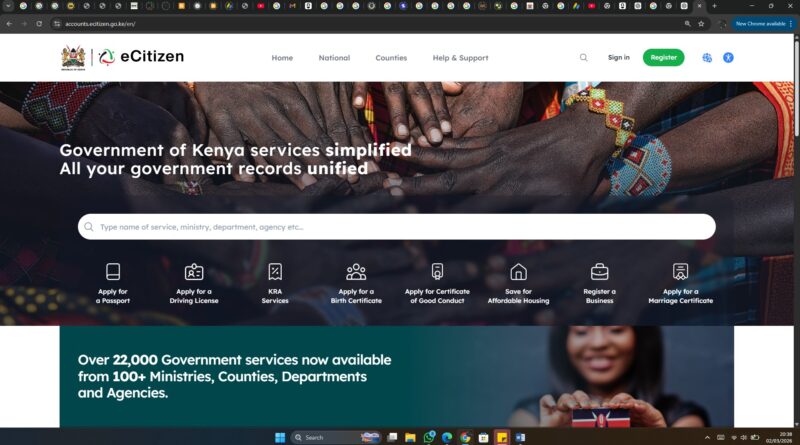
The eCitizen portal is Kenya’s official digital government platform that allows citizens and residents to access public services online.
Through your eCitizen account, you can apply for:
NTSA driving license services
Business name registration
Marriage certificate services
Good Conduct Certificate
Instead of visiting government offices, you can complete most applications and payments online.
Requirements for eCitizen Registration in Kenya
Before you start the eCitizen account creation process, make sure you have:
✔ Valid Kenyan National ID
✔ Active mobile phone number (registered in your name)
✔ Working email address
✔ Internet access
Foreign residents can register using a Foreigner Certificate number.
Step-by-Step: How to Register on the eCitizen Portal
Follow this updated 2026 registration guide carefully.
Step 1: Visit the Official eCitizen Website
Go to:
👉 https://accounts.ecitizen.go.ke
Always confirm you are using the official website to avoid fraud.
Step 2: Click “Create an Account”
On the homepage:
Select Create an Account
Choose:
Kenyan Citizen
Foreigner Resident
Business Registration
Child Registration
Most users should select Kenyan Citizen.
Step 3: Enter Your Personal Details
Fill in:
National ID number
Full names (exactly as on ID)
Date of birth
Email address
Mobile number
Ensure all details match your ID to avoid verification issues.
Step 4: Verify Your Phone Number (OTP)
You will receive a One-Time Password (OTP) via SMS.
Enter the OTP to confirm your identity.
If you don’t receive it:
Check network coverage
Confirm your phone number
Request another code
Step 5: Create a Strong Password
Use a secure password that includes:
Uppercase letters
Lowercase letters
Numbers
Special characters
Example: Kenya@2026Secure
Step 6: Complete Registration and Login
After verification:
Your eCitizen account will be created
You will receive confirmation via email
You can now log in using your ID number and password
How to Login to Your eCitizen Account
To access services:
Visit the eCitizen portal
Click Sign In
Enter your ID number
Enter your password
Click Login
If you forgot your password, use the “Forgot Password” option to reset it.
eCitizen Services You Can Access After Registration
Once registered, you can apply and pay for:
Passport application and renewal
NTSA smart driving license
Motor vehicle search
Business name search and registration
Police clearance certificate
Is eCitizen Registration Free?
Yes. Creating an account on the eCitizen portal is completely free.
However, government services have different fees depending on the application type.
Common eCitizen Registration Problems and Fixes
1. ID Already Registered
This usually means:
You created an account before
Someone used your ID
Solution: Use “Forgot Password” to recover access.
2. OTP Not Received
Confirm your SIM is registered in your name
Restart your phone
Try again later
3. Account Locked
After multiple failed login attempts, your account may lock temporarily. Wait 30 minutes before retrying.
Benefits of Registering on eCitizen
24/7 online government access
Secure online payments
Faster processing times
Reduced travel costs
Application tracking
Frequently Asked Questions (SEO Optimized)
How long does eCitizen registration take?
It takes less than 10 minutes if your details are correct.
Can I register eCitizen without a National ID?
No. A valid Kenyan National ID is required.
Can foreigners register on eCitizen?
Yes. Foreign residents can register using their Alien ID.
Final Thoughts
If you live in Kenya, knowing how to register on the eCitizen portal is essential. With your account, you can apply for passports, driving licenses, business registration, and many other government services online.
The registration process is free, simple, and secure.
