

How to Retrieve your iTax Password Online
The tax man would be on your case around June, well by then you should actually have filed your tax returns on the new iTax system. Considering that iTax is new, you probably just signed up and never thought of keeping the iTax password for future use. These happens even to the very best of us, we have many passwords remembering the iTax password is the last thing on our mind. Well worry not, let’s try and figure out how to retrieve the iTax password in case you have forgotten it. In simple steps, here is how to use the “forgot password” button on the Kenya Revenue Authority iTax website.
What you need
- Your KRA pin number
- Working email plan (this would be the email address used to sign up on iTax)
- Answer to the security question set when signing up (You will find this details in the email address used for iTax) :- admin.iTax@kra.go.ke
Procedure
- Go to the iTax portal page
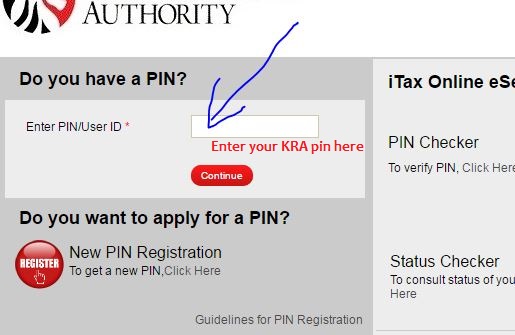
- Go to “enter pin or user id” on the left upper part the page fill in your pin and click continue
- On the bottom left of the page click on the “Forgot Password or unlock account”
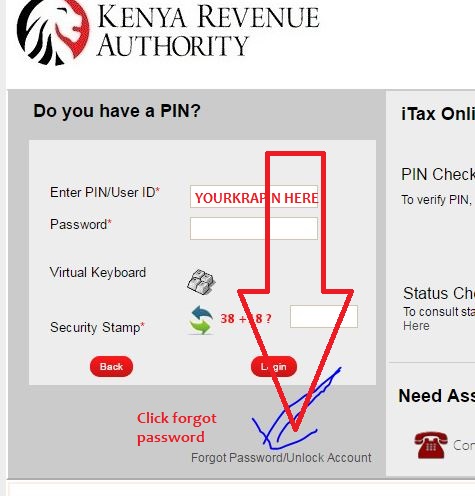
KRA forgot password/unlock account - A new window opens here pick your security question from the drop down menu
- Provide the answer to the security question and click submit
- A reset password will be sent to your email address
- Check your email address after sometime. Log in with the reset password
- It will prompt you to change the password to something you will remember
RELATED ARTICLES: How to file your employment income tax returns


PLEASE SEND MY P/SWORD FOR A009549321C TO 708809089
Joel
Password reset is easily done by self. It takes a very short while
I have forgoten my password please help
I am trying to login into my account so as to fill nil returns but there is a part of filling old password unfortunately I dont remember my old password. What can I do?
Hi am trying log in the new password sent to my email…yet am still asked to enter an old password of which i cant remember. kindly assist
The password you are being asked is the one they sent you.
After getting the code to reset my password, am not getting the page to create my password again
how am i supposed to put my old password which obviously i forgot so as to reset??seriously
Please sent my passward to 0718509853
forgot password
My e-mail address i used is no longer in service. How do i get my password? Kindly send my password to phone no. 0716129315
Hello! I am Caroline Mwende Micheni ID No.33339695 Pin No. A011326336M. I gave the wrong E-mail address during pin application and now I cannot remember the password to log in to my account to file returns.
Kindly change the email so that I can reset the password. My new E-mail address is smileycaloline02@gmail.com phone number 0715277341
Thank you.
Regards,
Caroline Mwende
hi kindly send me my password to my phone no 0722229732 i have already paid for otp verification fee of 200 or send to the following email address rmuema@mwalimunationalsacco.coop
Please send my new password to 0706621619
I want to change my company password.
Please send the new password to; margmwakale@gmail.com. This is the new i Tax Email Address since I lost my initial email details. Tank you.
please send the new password achiengaudreey2030@gmail.com.
That is the email am using now,kindly assist…i can even remember the past email
I need kra password
I would like to reset my kra password my pin is A005673452Z
do u have an email add,if so just call me ill talk you through 0789009052
when will be system be back? it is temporarily unavailable
Kindly assist to reset password
My old Email address is no longer in service preventing me from accessing the password sent
hey for how long do i need to wait for my password in my email
hi,,
I forgot my password but the phone number I used to register no longer exist please I your assistance.
please assist to reset my itax password the e- mail address I used is nolonger in service
i can get to my password which has bn sent to my email address which i cant access.how can i be helped surely
please assist me to reset my itax password the e- mail address I used is nolonger in service
please assist to reset my itax password the e- mail address I used is nolonger in service
Where do I need to enter my email in order to get my old password
I forget my itax password and the mail I used to register the pin is no longer in service what do I do then?
You will need to contact KRA Customer service for assistance.
I need to edit my profile to show that i have income to enable me file my returns
Hi am trying log in the new password sent to my email…yet am still asked to enter an old password of which i cant remember. kindly assist
Hi am trying log in the new password sent to my email…yet am still asked to enter an old password of which i cant remember. kindly assist
change of email address since i have forgotten the password for KRA
Hey
Have you tried the procedure above?
I’ve followed the steps, but I’m asked to enter old password, yet I’m trying to set a new because i can’t remember the old one
Hey
All you need to do is enter your email address and they will send you a reset password..This is the one they send on your email.thats the old password you need
after keying in the pin,the system reply’s invalid password
Thanks for your help
Hi,
Good to have been of help.
need to reset my password
MY EMAIL HAS LOCKED AND I CANNOT RESET MY PASSWORD IN KRA PORTAL. WHAT CAN I DO SINCE I HAVE NEW WORKING EMAIL ADDRESS
Hi
I think you may need to visit the nearest KRA office for help.